• Home
  • Features
    • Overview
    • Cold Storage
    • Zoolz Tribrid
    • DIY IT
    • Snowball
  • Pricing
  • Industries
    • How Zoolz Helps Different Industries
    • Media & Entertainment
    • Photography & Videography
    • Healthcare
    • Architecture & Engineering
    • Education & Research
    • Advertising & Digital Marketing
    • Legal Firms
    • Gaming & Game Development
    • Government Agencies
    • Creative Agencies
  • Resources
    • Datasheets
    • Data Center
  • Why Zoolz?
    • About us
    • Our Clients
    • Contact us
    • FAQs
    • Help
  • Sign In
  • Sign Up
Sign in
Sign up
Guides, Insights

Zoolz End of the Year Backup Checklist: Secure Your Digital Life Before 2026
December 15, 2025 Robin Robin Comments Off on Zoolz End of the Year Backup Checklist: Secure Your Digital Life Before 2026
Zoolz Year-End check list

The end of the year is more than a calendar milestone—it is a critical checkpoint for your digital life. Over the past 12 months, personal users and businesses alike have accumulated vast amounts of data: documents, financial records, creative work, system files, and irreplaceable memories.

According to IBM’s Cost of a Data Breach Report, the average cost of data loss reached USD 4.45 million in 2023, with poor backup and recovery strategies cited as a major risk factor.

A structured year-end backup checklist ensures your data is protected, recoverable, and compliant—starting the new year without unnecessary risk. With Zoolz, users benefit from enterprise-grade cloud backup built on Amazon S3, offering unmatched durability, scalability, and security.

Step 1: Audit What Truly Matters Before Year-End

Identify Critical Data

Before running backups, review what must be preserved:

  • Financial and tax records
  • Legal and compliance documents
  • Business databases and virtual machines
  • Personal photos, videos, and creative assets

Zoolz supports backups from internal, external, and network drives, ensuring no critical source is missed.

🔗 Backing Up Data from Internal, External and Network (NAS) Drive
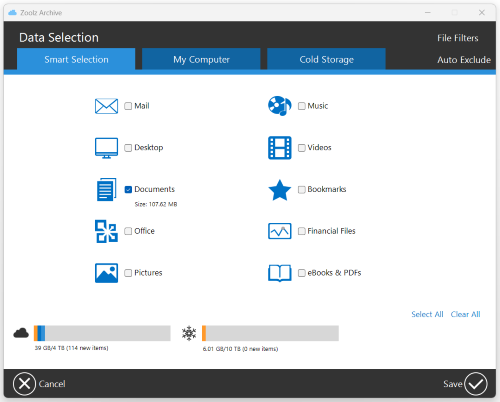
Data Selection - Smart Selection - Documents

Remove Unnecessary Files

Excluding redundant or temporary files improves backup efficiency and storage utilization.

🔗 Manage Backup Exclusions in Zoolz

Step 2: Choose the Right Storage Strategy with Zoolz

Cold Storage for Long-Term Archiving

Zoolz Cold Storage is ideal for compliance records, archives, and historical data. It delivers ultra-low-cost storage with Amazon-level durability (99.999999999%).

🔗 Cold Storage

Instant Storage for Frequently Accessed Files

For files requiring immediate access, Instant Vault provides fast restores without retrieval delays.

🔗 Understanding Instant vs. Cold Storage in Zoolz: Key Differences Explained

Hybrid Backup for Maximum Protection

Zoolz Hybrid Backup maintains a local copy plus cloud redundancy, ensuring fast recovery even during internet outages.

🔗 Zoolz Hybrid+ Backup: Enhancing Data Protection and Recovery Efficiency
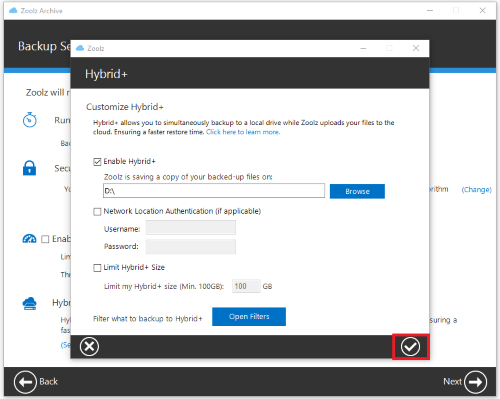
Customize Hybrid

Step 3: Verify Backup Health and Completion

At the end of the year, confirming backup integrity is essential.

  • Review failed or skipped files
  • Enable periodic re-scans
  • Understand incremental backup behavior

Step 4: Secure Your Account Before the New Year

Security misconfigurations are a leading cause of data breaches.

Strengthen Authentication

  • Enable Two-Factor Authentication (2FA)
  • Reset or recover passwords if needed

Encryption and Privacy

Zoolz supports end-to-end encryption, with optional private encryption keys that even Zoolz administrators cannot access.
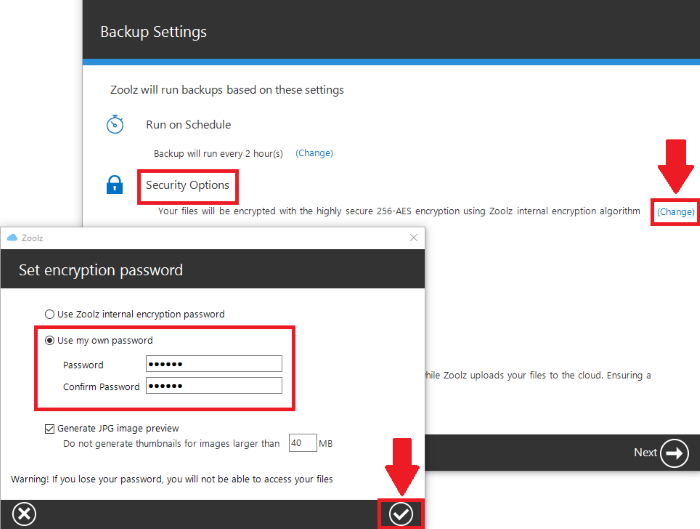
🔗 Data Encryption with Zoolz

Security Options - Use my own password

Step 5: Test Your Restore Process (Do Not Skip This)

A backup is only valuable if it restores successfully.

  • Restore individual files
  • Recover older versions
  • Migrate to a new computer

Zoolz also offers remote restore, allowing recovery even if the original device is unavailable.

🔗 Remote Restore with Zoolz

Start your free trial now

Step 6: Review Storage Usage and Upgrade if Needed

Running out of storage during a backup can leave critical files unprotected.

  • Check billing and storage usage
  • Upgrade your Zoolz plan seamlessly

Zoolz plans scale easily, making them suitable for both individuals and growing organizations.

Step 7: Prepare for Ransomware and Cyber Threats

Ransomware attacks increased by over 70% year-over-year, according to Sophos.

Zoolz protects against ransomware by:

  • Maintaining versioned backups
  • Allowing clean restores after encryption attacks

This makes Zoolz a critical component of any year-end cybersecurity strategy.

Frequently Asked Questions (FAQ)

❓ Why should I review my backups at the end of the year?

The end of the year ensures all annual data is protected, verified, and recoverable before starting new projects or fiscal periods.

❓ Is Zoolz secure enough for sensitive data?

Yes. Zoolz uses AES-256 encryption, Amazon S3 infrastructure, and supports private encryption keys. (Learn more)

❓ Can Zoolz back up multiple computers?

Yes. Zoolz supports multiple devices under one account, depending on your plan. (Learn more)

Final Thoughts: Start the New Year Fully Protected

Completing a Zoolz end of the year backup checklist is one of the smartest digital habits you can adopt. It reduces risk, improves resilience, and ensures peace of mind—whether you are protecting personal memories or business-critical systems.

Start your free trial now and enter the new year with confidence.

Sign Up Now
Robin Robin

Tech journalist with a passion for uncovering the latest trends in cloud storage and cybersecurity. Focuses on delivering insightful analysis and in-depth reviews to keep readers informed and ahead of the curve.

Post navigation

Previous

Search

Categories

  • Business (15)
  • Guides (18)
  • Insights (16)
  • Technology (12)

Recent posts

  • Zoolz Year-End check list
    Zoolz End of the Year Backup Checklist: Secure Your Digital Life Before 2026
  • Black Friday Backup
    Zoolz Black Friday Data Backup: Protect Your Deals, Receipts & Digital Purchases
  • Multi-User Backup
    Zoolz Multi User Backup: The Cloud Solution for Families & Teams

Tags

archive with cloud Backup backup for designers backup solutions black friday black friday data backup business cloud cloud backup cloud backup checklist cloud security cloud storage cold storage data data archiving data backup data deletion policy data loss data privacy data protection data recovery data security deleted files disaster recovery emergency cloud backup end of the year backup family cloud backup file retention free up space healthcare hybrid backup local long-term backup multi user backup on-premise backup online storage protection ransomware protection secure secure cloud storage secure data backup secure data deletion security team backup solutions Zoolz

Related posts

Black Friday Backup
Insights

Zoolz Black Friday Data Backup: Protect Your Deals, Receipts & Digital Purchases

November 23, 2025 Robin Robin Comments Off on Zoolz Black Friday Data Backup: Protect Your Deals, Receipts & Digital Purchases

Black Friday is the world’s busiest shopping event. Adobe Analytics reported over $9.8 billion spent online during Black Friday 2023, with millions of orders placed within hours. As shoppers race to secure limited-time deals, they often overlook one critical detail: Your receipts, invoices, activation codes, and purchase files need protection just as much as your […]

Multi-User Backup
Guides

Zoolz Multi User Backup: The Cloud Solution for Families & Teams

November 19, 2025 Robin Robin Comments Off on Zoolz Multi User Backup: The Cloud Solution for Families & Teams

When households and teams rely on multiple devices—laptops, desktops, and shared workstations—data protection becomes more complicated. A single cloud backup account is no longer enough. This is where a multi user backup solution becomes essential. Zoolz was built with real families, professionals, and distributed teams in mind. With flexible multi-user cloud backup plans, centralized management, […]

Zoolz and World Kindness Day
Insights

World Kindness Day: Secure File Sharing Made Easy with Zoolz

November 6, 2025 Robin Robin Comments Off on World Kindness Day: Secure File Sharing Made Easy with Zoolz

In a world that’s always online, sharing is our modern form of kindness. From sending cherished memories to collaborating on vital work projects, we connect through shared files every day. But kindness can turn into chaos if our shared data falls into the wrong hands. That’s where Zoolz comes in — making secure file sharing […]

Newsletter

Never Miss a Cloud: Subscribe Now to Get Our News, Offers, & Product Updates

The world's most affordable and powerful cloud backup solution.

Company
  • About us
  • Our Clients
  • FAQs
Partners
  • Become A Partner
  • Affiliates
Help
  • Support center
  • Feedback
  • Contact Sales
  • Contact Technical Support
Resources
  • Blogs
  • Datasheets
  • Industries
Compliance
  • GDPR
  • DPA
  • Data Centers
51.492917, -0.219750
All Systems Operational:
© 2025 Zoolz. All Rights Reserved.
  • Report an issue
  • Privacy policy
  • Terms / EULA
  • Cookies policies