Secure Your Tax Documents Backup with Zoolz Before It’s Too Late
Every April, millions of individuals, small business owners, and accountants find themselves navigating the same stressful reality: mountains of financial records, receipts, W-2s, invoices, and returns — all of which need to be accessible, accurate, and above all, safe.
What many people overlook, however, is that tax season is also peak season for data loss. Hard drive failures, accidental deletions, ransomware attacks, and phishing scams all spike as filing deadlines approach. If your critical financial documents are stored only on a local machine or a USB drive, you are one technical mishap away from a serious problem.
That is where a reliable documents backup strategy becomes not just a good idea — but an absolute necessity. Zoolz is designed to help individuals, SMBs, and accounting professionals keep their most important files protected, organized, and retrievable year-round.
Why Tax Documents Deserve a Dedicated Backup Strategy
Think about the documents you handle during tax season: bank statements, payroll records, expense reports, scanned receipts, prior-year returns, and client financial data. These files share two important characteristics — they are irreplaceable, and they are highly sensitive.
The IRS and tax authorities in most countries recommend retaining tax records for a minimum of three to seven years. That means your backup solution needs to do more than just save a copy of today’s files. It needs to preserve them reliably for the long term, protect them against unauthorized access, and make them easy to retrieve when an audit or amendment arises.
A thoughtful document’s backup plan built around Zoolz addresses all of these requirements from day one.
Automated Backup: Set It Once, Protect It Always
One of the most common reasons people lose important files is simple: they forget to back them up. During a hectic tax season, manually copying files to an external drive or cloud folder is the kind of task that gets pushed to tomorrow — until tomorrow is too late.
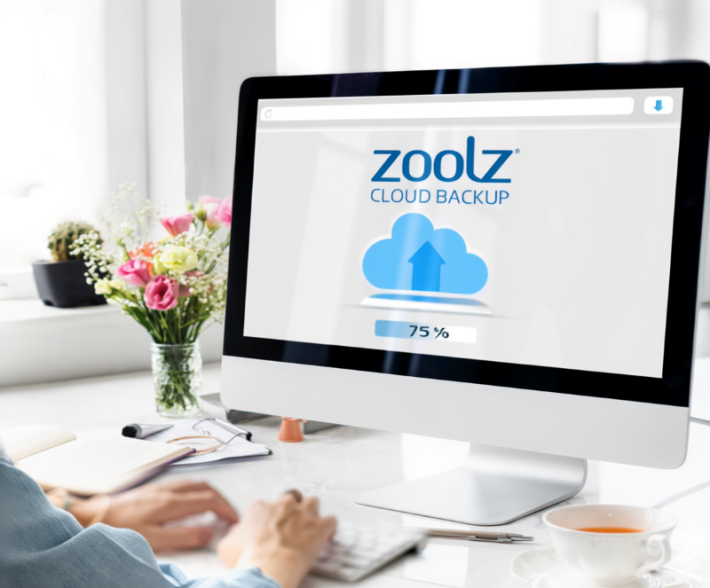
Zoolz eliminates this risk entirely with its powerful automated scheduling capabilities. You can configure Zoolz to run backups at intervals that suit your workflow — hourly, daily, or weekly — and it will work quietly in the background without disrupting your productivity.
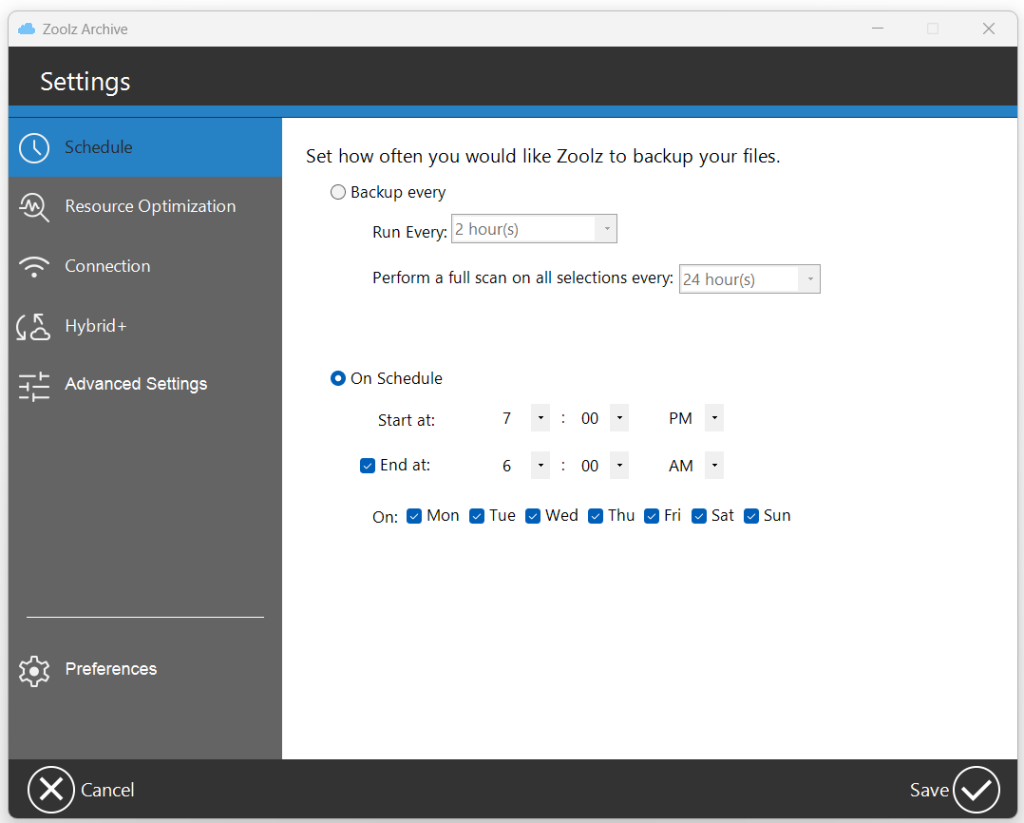
The incremental backup method ensures that only new or changed files are uploaded after the initial backup. This keeps the process fast and efficient without re-uploading your entire archive every time.
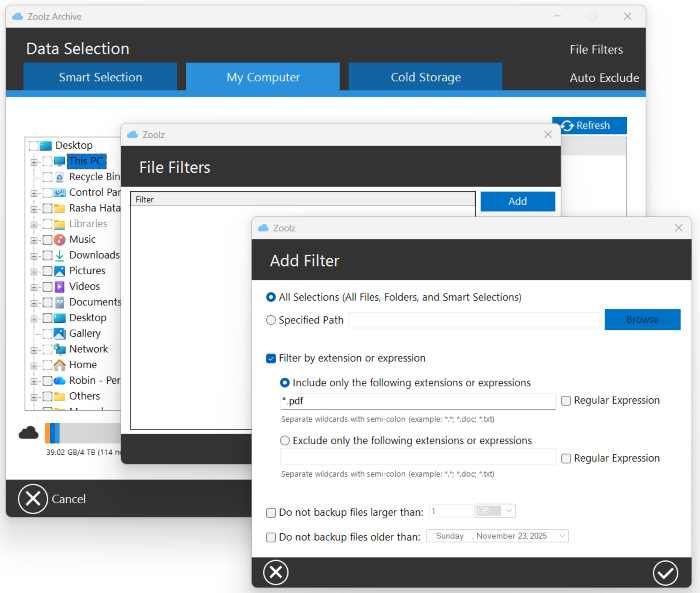
For accountants managing files across multiple client folders, Zoolz also supports file filters that allow you to fine-tune exactly which files and folders are included in each backup job — giving you precision control without complexity.
Cold Storage: The Right Home for Long-Term Tax Records
Not every file needs to be instantly accessible every day. Older tax returns, archived client records, and prior-year receipts are documents you may rarely need — but cannot afford to lose.
This is exactly the use case that Zoolz Cold Storage was built for. Cold Storage offers a cost-effective way to preserve large volumes of data long-term, keeping it safely archived and retrievable when needed. It is powered by Amazon Glacier infrastructure, offering enterprise-grade durability at a fraction of the cost of standard cloud storage.
Want to understand the difference between Instant Storage and Cold Storage? Instant Storage is ideal for files you access regularly, while Cold Storage is the smart choice for archiving documents you need to retain but rarely touch — precisely the profile of most historical tax records.
With the Zoolz Tribrid backup model, you can combine local backup, Instant Cloud Storage, and Cold Storage in a single, unified strategy. This means your most recent tax files stay immediately accessible, while older records are automatically moved to long-term cold archive — all managed from one dashboard.
Encryption & Security: Because Tax Data Is Sensitive Data
Financial records are among the most targeted data types by cybercriminals. Tax documents often contain full names, Social Security numbers, employer identification numbers, account details, and income figures — everything an identity thief needs.
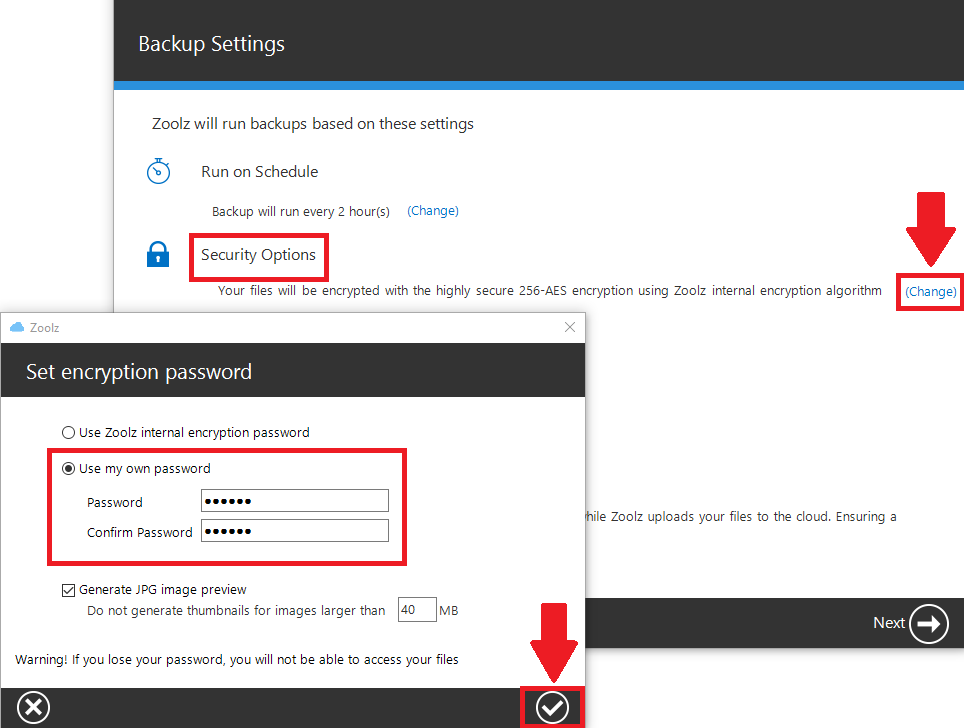
Zoolz protects your documents backup with AES 256-bit encryption, the same standard trusted by governments and financial institutions worldwide. Your files are encrypted both in transit and at rest, meaning they are scrambled and unreadable at every point in the journey from your device to the cloud.
You can even set your own custom encryption password, ensuring that only you hold the keys to your data. For businesses and accountants, Zoolz is also compliant with major regulatory standards — learn more about Zoolz’s compliance certifications including HIPAA, ISO 27001, and PCI DSS.
If ransomware ever targets your system, Zoolz has you covered there, too. The platform enables you to restore older versions of your files from before an attack occurred, and the dedicated ransomware recovery guide walks you through the recovery process step by step.
Practical Tips for Tax Season Document Backup
Here are a few simple habits to strengthen your document backup strategy during tax season:
✅ Consolidate before you back up. Create a dedicated folder for the current tax year and organize all relevant documents into it before your backup runs. This makes retrieval far easier during an audit or amendment.
✅ Verify your backup is running. Use Zoolz’s reporting tools to confirm that your scheduled backups are completing successfully. A backup that is silently failing offers no protection.
✅ Back up from all your devices. If you work across a desktop, a laptop, and external drives, make sure all of them are covered. Zoolz supports backup from internal, external, and network drives within a single account.
✅ Set file retention to match legal requirements. Zoolz allows you to configure file retention policies so your historical tax documents are preserved for as long as regulations require.
Start Protecting Your Tax Documents with Zoolz Today
Tax season does not wait, and neither should your backup strategy. Whether you are an individual filer wanting peace of mind, a small business owner safeguarding years of financial records, or an accountant responsible for sensitive client data — Zoolz provides the tools to keep every document safe, encrypted, and accessible.
With automated smart backup, long-term Cold Storage archiving, and bank-grade encryption, Zoolz is the documents backup solution built for the way real people and businesses actually work.
Sign up for a free Zoolz trial today and enter tax season with the confidence that your most critical files are fully protected — now and for every year to come.